Plans
Goals and OKRs
A goal says what you want to be true, and key results measure it. Check in each week so everyone can see how it's going.
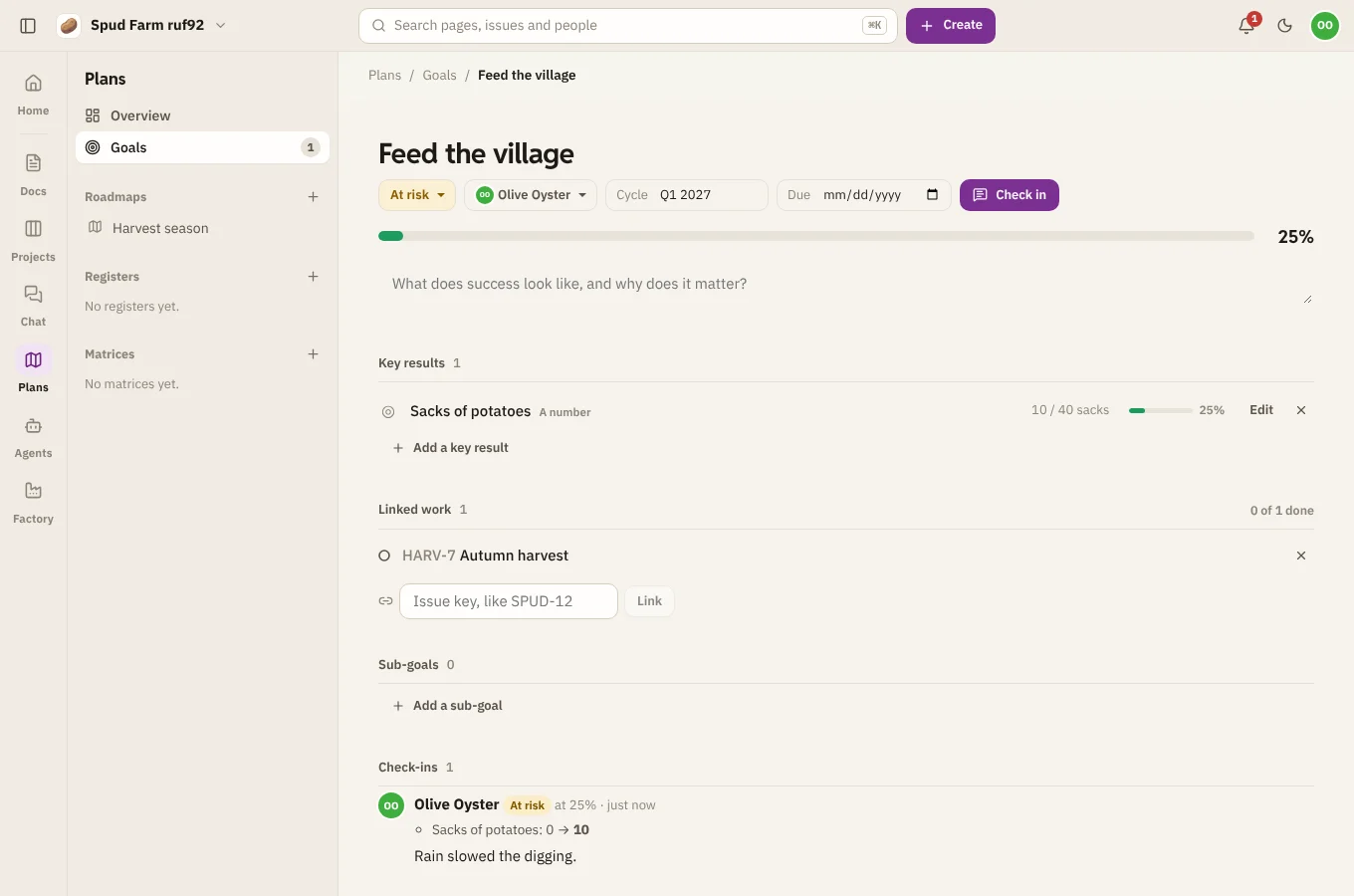
Set a goal
Choose New plan › Goal. Give it a title (like "Grow the patch to 200 regulars"), and optionally an owner, a cycle such as "Q1 2027", a due date and a description of what success looks like and why it matters.
A goal's status is one of pending, on track, at risk, off track, done or cancelled.
Key results
Choose Add a key result and pick how it's measured:
| Measured as | Example |
|---|---|
| A number | 200 sign-ups, from a start of 40 |
| A percentage | 95% of orders on time |
| Done or not | Launch the farm shop |
| Linked work | The progress of the goal's linked epics and issues |
A goal's progress is the average of its key results. With no key results, it comes from its linked work.
Link work
Under Linked work, add the epics and issues that move the goal by their key, such as SPUD-12. An epic counts its children, so progress moves as the team closes issues.
Check in
Choose Check in. Set the status, update the numbers, and say a word: what moved, what's in the way, what's next. Check-ins are listed on the goal, newest first, for everyone following it.
Sub-goals
Break a big goal into smaller ones with Add a sub-goal. Archiving a goal moves its sub-goals up a level.