Agents
Installing a runner
A runner is the small program that does your workflows' work, on a machine you choose. Install one on your laptop to try things out, and on a server, Docker host or Kubernetes cluster for work that should keep running. Every install command is on the Runners page, filled in for your workspace.
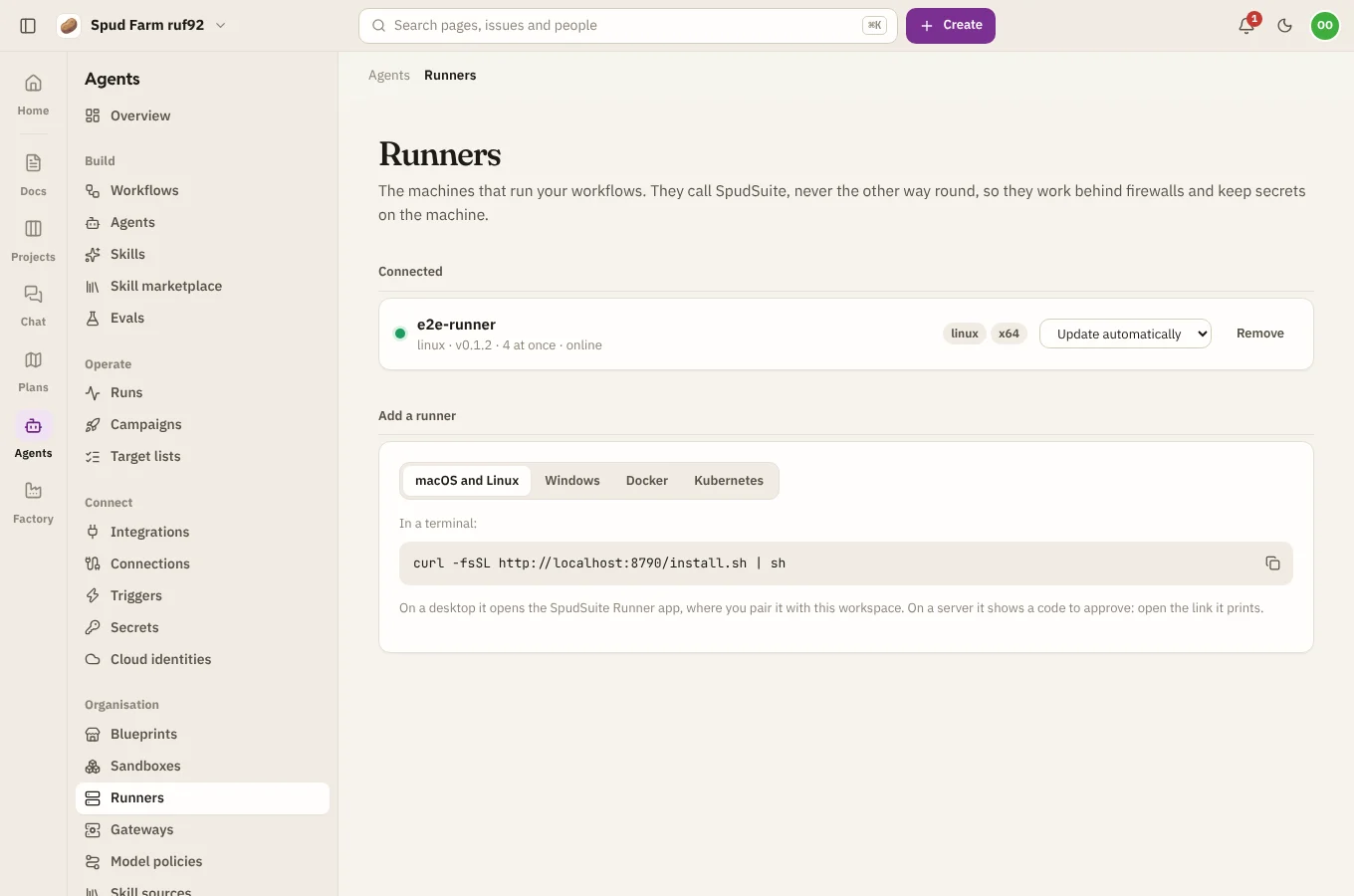
Runners only ever call out to SpudSuite over HTTPS, so they work behind firewalls and on home networks with nothing to open. You need to be a workspace admin to connect one, or to approve one someone else installed.
macOS and Linux
In a terminal:
curl -fsSL https://agents.spudsuite.com/install.sh | sh
The installer puts the spud command on your machine (it installs Python tools with uv, so there's nothing else to set up) and adds a desktop shortcut. On a desktop, the SpudSuite Runner app then opens in your browser. Sign in and pick your workspace, and the runner is paired.
On a server with no desktop, the runner prints a short code and a link instead. A workspace admin opens the link and approves the code (see Pairing).
Windows
In PowerShell:
irm https://agents.spudsuite.com/install.ps1 | iex
It does the same as on macOS and Linux: installs spud, adds a desktop shortcut and opens the runner app to pair.
The runner app
The runner app is a small page on your own machine, at http://127.0.0.1:7317, opened from the desktop shortcut or with spud app. Use it to pair, start and stop the runner, change its settings (name, labels, how many runs at once), and keep the runner's secrets. Nothing in it is reachable from other machines.
Pairing
- From the runner app: sign in and pick the workspace.
- From a terminal: run
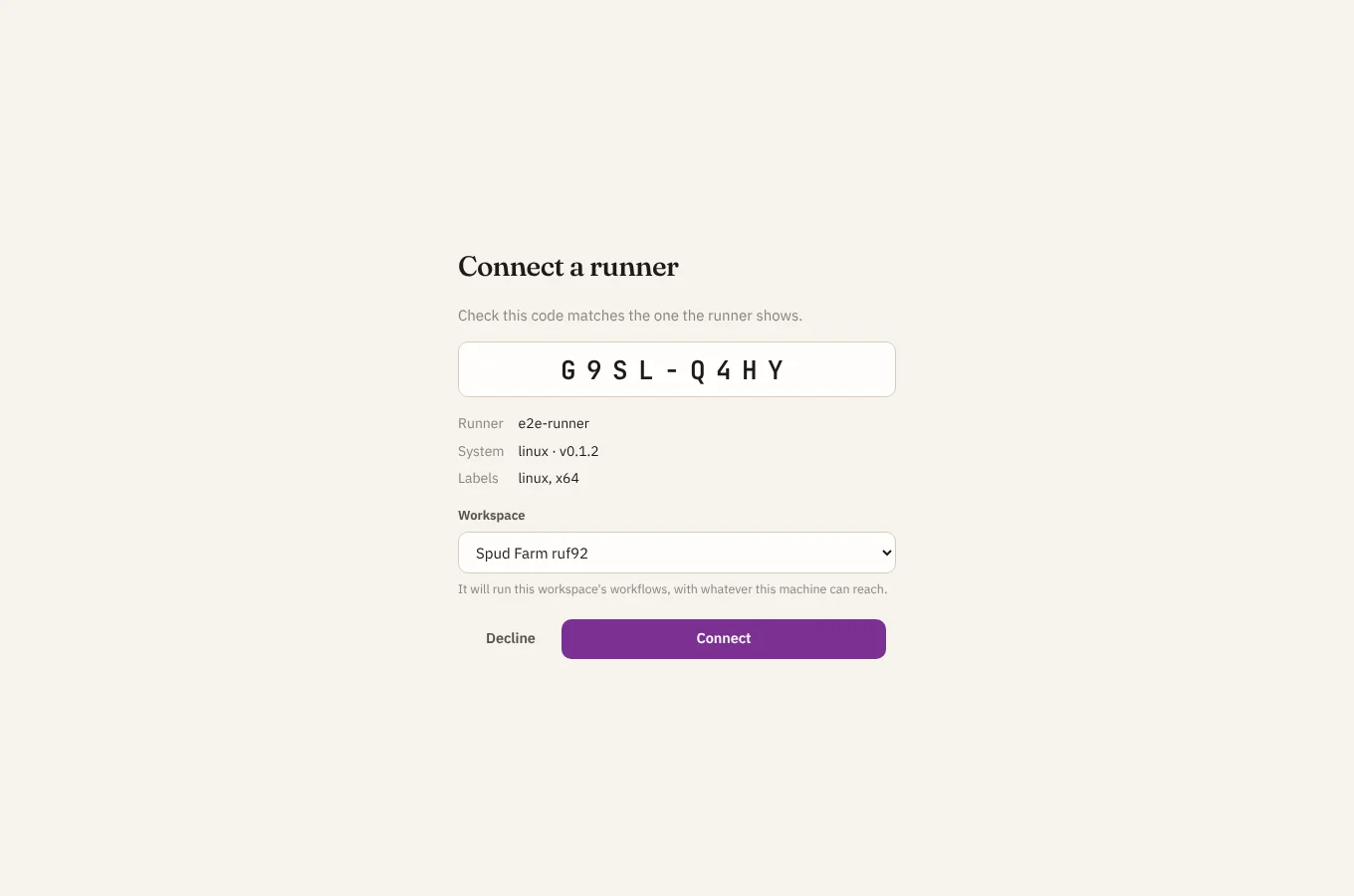
spud runner pair agents.spudsuite.com. It shows a code likeABCD-EFGHand a link. A workspace admin opens the link (or Agents › Runners), checks the code matches, and chooses Approve.
Keep it running
To start the runner whenever you sign in to the machine:
spud runner service install
That adds a background service: a systemd user service on Linux, a launchd agent on macOS, or a sign-in task on Windows. spud runner service uninstall removes it. Without a service, spud runner start runs it until you stop it.
Docker
For Docker, a workspace admin first makes a registration token on the Runners page (under Registration tokens). It lets containers join without anyone approving a code. Then:
docker build -t spudsuite-runner https://agents.spudsuite.com/downloads/spudsuite-runner-docker.tar.gz
docker run -d --name spudsuite-runner --restart unless-stopped -v spudsuite-runner:/data \
  -e SPUDSUITE_SITE=https://agents.spudsuite.com \
  -e SPUDSUITE_REGISTRATION_TOKEN=ssreg_... spudsuite-runner
The volume keeps the runner's credential and secrets, so it stays the same runner across restarts. You can also set SPUDSUITE_RUNNER_NAME, SPUDSUITE_RUNNER_LABELS (comma-separated) and SPUDSUITE_RUNNER_CAPACITY (runs at once, 4 by default). With Docker Compose, after building the image:
services:
  runner:
    image: spudsuite-runner
    restart: unless-stopped
    environment:
      SPUDSUITE_SITE: https://agents.spudsuite.com
      SPUDSUITE_REGISTRATION_TOKEN: ssreg_...
      SPUDSUITE_RUNNER_NAME: docker
      SPUDSUITE_RUNNER_LABELS: docker
    volumes:
      - runner-data:/data
volumes:
  runner-data:
Kubernetes (Helm)
Build the image as for Docker and push it to a registry your cluster can pull from. Then, with a registration token:
helm install runners https://agents.spudsuite.com/downloads/spudsuite-runner-chart.tgz \
  --set site=https://agents.spudsuite.com \
  --set registrationToken=ssreg_... \
  --set image.repository=<your registry>/spudsuite-runner
Each pod registers as its own runner, named after the pod, and keeps its credential on its own volume. Useful settings:
| Setting | What it does |
|---|---|
replicas |
How many runners (pods) to run |
capacity |
Runs each one takes at once (4) |
labels |
Labels runs can ask for (kubernetes) |
existingSecret |
Use a Secret you made (key token) instead of registrationToken |
sandbox |
local runs script and agent steps in the runner's pod; kubernetes starts a pod for each |
resources, persistence.size, nodeSelector, tolerations |
The usual Kubernetes knobs |
Updates
The Runners page shows each runner's version, and says when a newer one is available. For each runner, choose how it updates:
- Update when asked: a workspace admin chooses Update when it suits them.
- Update automatically: it updates itself when a new version comes out.
Either way, a runner finishes the runs it's on first. It checks the new version's files before installing them, makes sure the new version starts, and goes back to the old one if it doesn't. A runner in a container can't replace itself: the Runners page tells you which image to pull instead. Running the install command again also updates a runner.
Remove a runner
On the Runners page, choose Remove next to it. It stops taking runs straight away, runs it was holding are marked lost, and its credential stops working. To use the machine again, pair it again. On the machine itself, spud runner unpair forgets the credential.
Check on it
spud runner status says whether the runner is paired and can reach SpudSuite. spud --version shows its version.